In short
Problem. Phone GPS can go badly wrong at speed. A short commute can report a speed no vehicle on that road could reach, and most ride trackers either hide this or need extra hardware.
What I built. I built an Android app that records a ride from phone GPS alone. It has a filter that throws away bad GPS readings, a compact ride format shared by the app and the server, and a server designed to stay inside free hosting limits, live group rides included. I then took it from a private build to a closed test through Google Play. That meant sign-up with no passwords that is protected from abuse, backup and restore between phones, consent that blocks uploads until it is given, and releases from the command line.
What I measured. I measured how small the ride files are, how far a stored position can drift from the real one, and what real rides did to my first assumptions.
Want to try it? Slipstream is in a closed test through Google Play, and joining takes a few minutes. Join the test here.
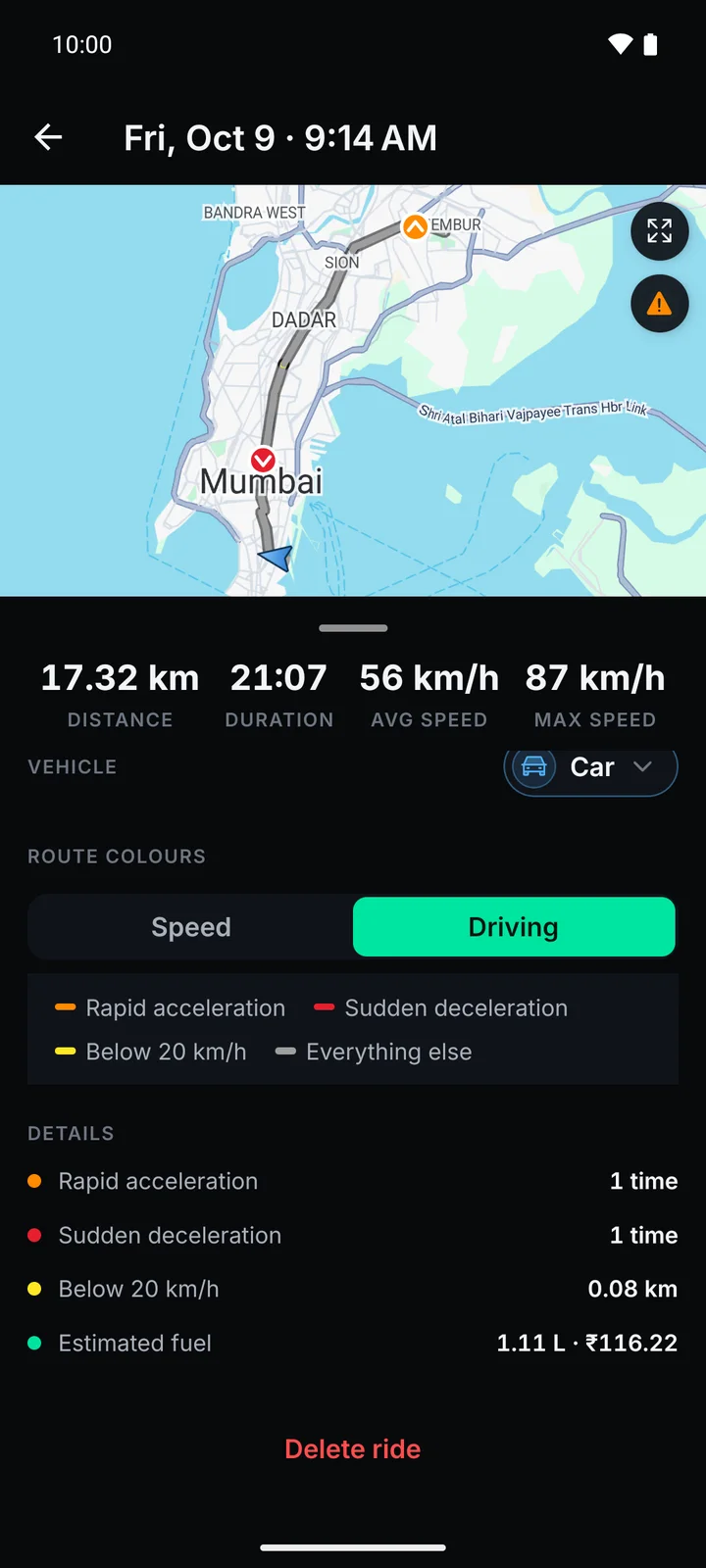
What it looks like
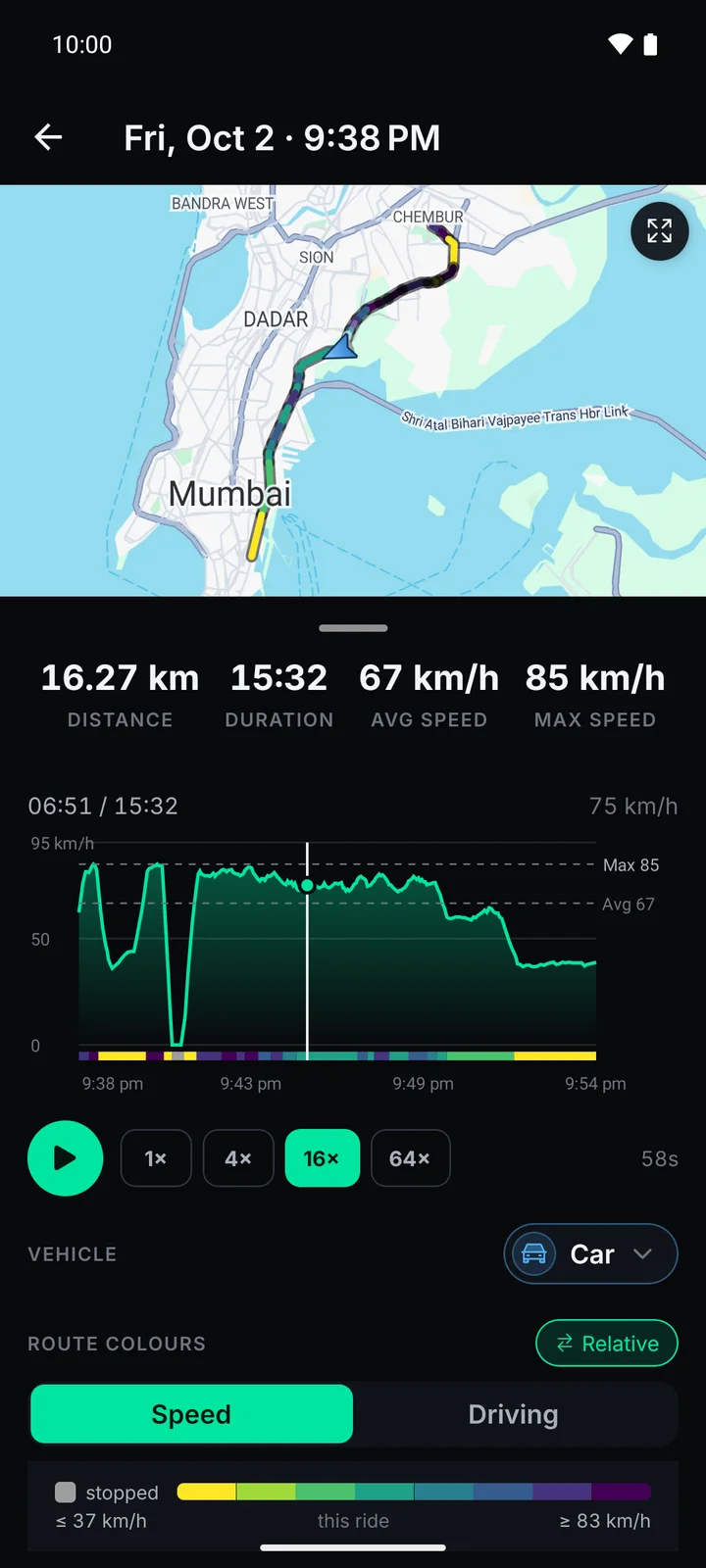
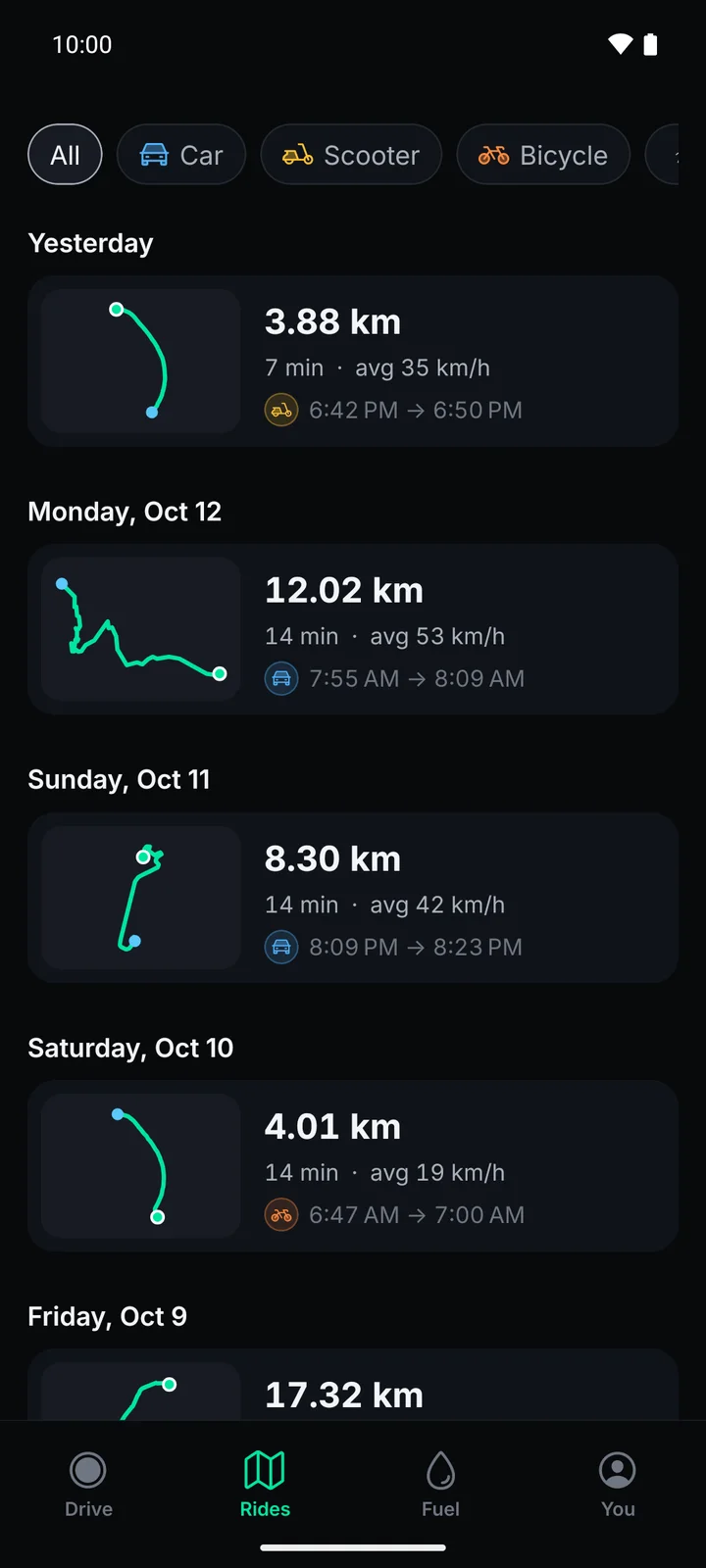
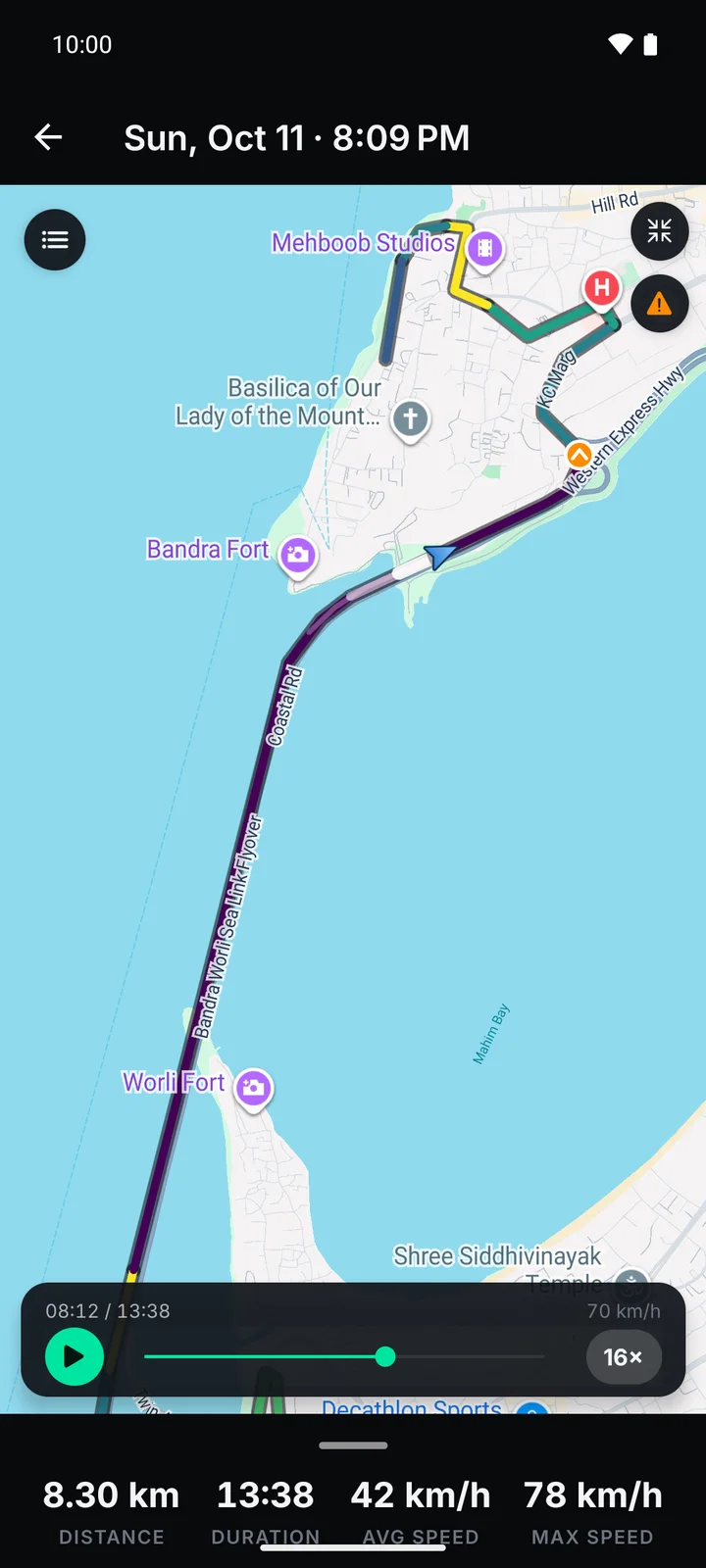
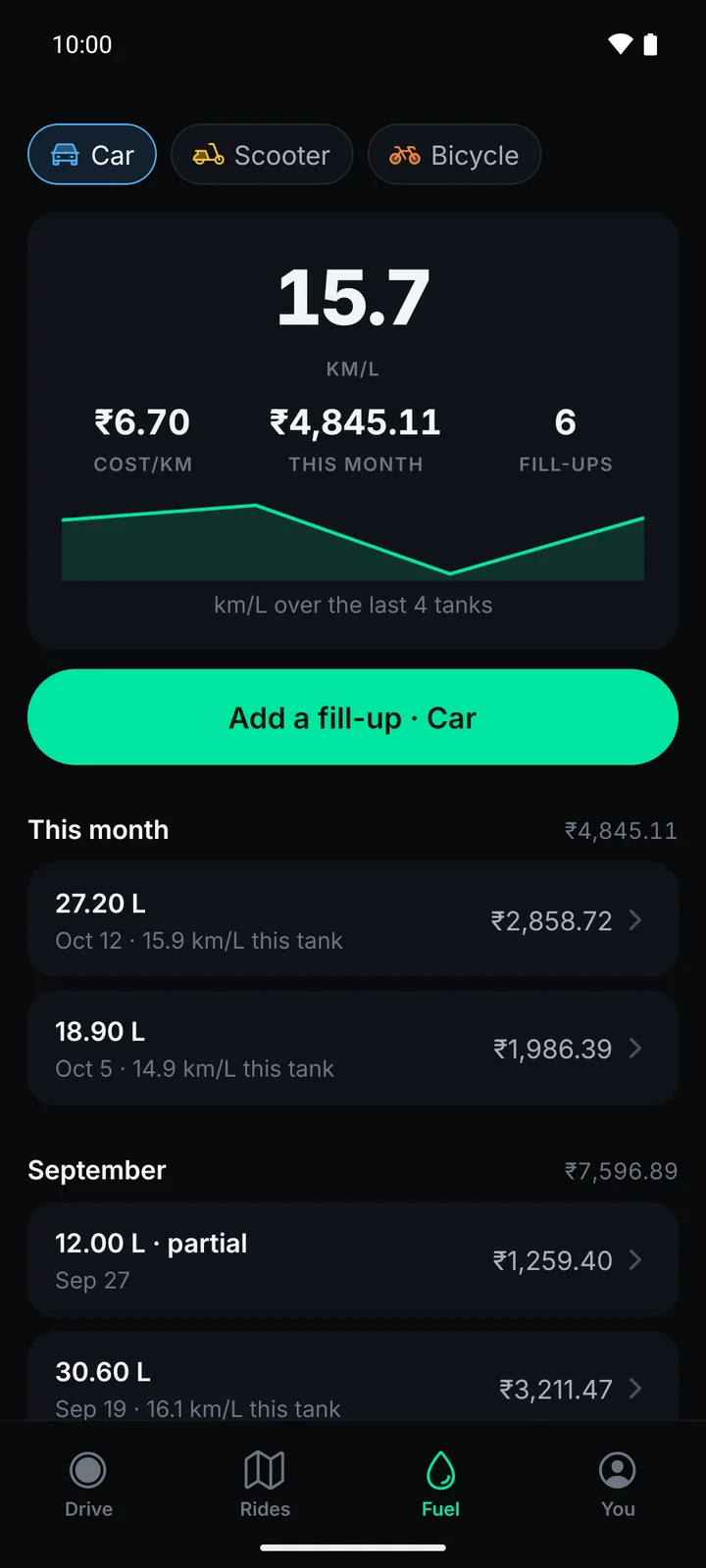
Try it: join the test
Slipstream is in a closed test through Google Play. Google needs at least 12 people to keep it installed for 14 days in a row before it can be released to everyone, and you can help. You need an Android phone, and it takes about two minutes.
- Join the tester group with the Google account your Play Store uses: Slipstream early adopters. Testing only works for that account.
- Become a tester. Open the testing page and tap Become a tester.
- Install it from Google Play. If it says the app isn't available, wait a few minutes after step 2 and try again.
Please keep it installed for the next 14 days. If testers drop out, the 14 days start again for everyone.
Already using an earlier version I sent you? Don't uninstall it yet, or you'll lose your rides and fuel logs.
- In the old app, go to You → Move to a new phone → Save backup, and save it to Downloads.
- Uninstall the old app, then install from Google Play.
- In the new app, go to You → Move to a new phone → Restore backup and pick that file.
What helps most: just use it. Record a few trips, look at the map afterwards, and add your vehicle and a fill-up if you like. If something looks wrong, like a strange line on the map, a speed that makes no sense, or the app stopping on its own, email me a screenshot and roughly when it happened. Email is better than posting in the group, because a map screenshot shows where you were.
Privacy: rides are stored on your phone. Cloud backup is your choice on the first screen, and you can delete your account and everything you uploaded from inside the app. Read the privacy policy.
1Context
Slipstream is for anyone who wants a better record of their rides. It shows how fast they really went and where, where the people close to them are when they ride together, and what their vehicle spends on fuel.
It started with my own commute. I ride to work every day, and no app I tried showed how fast or slow I actually went, or where on the route I was slow and where I was quick. So I made one that colours the ride by speed. Then I wanted to see where my friends were on a ride. When several of us go on a trip on different vehicles, anyone can start a live session, the others join it, and everyone sees where each of us is.
Slipstream turns phone GPS into speed-coloured replays and live group rides. It is an Android app with a Cloudflare backend, and the whole stack is TypeScript. A small group used it privately from August 2026. Since October it has been in a closed test through Google Play. Each build is made and published from the command line, to an internal test track first and then to the closed test.
I do not quote audience numbers.
2Constraints
- Noisy GPS readings. A parked phone draws a tangle of lines on the map, signals bouncing off buildings report absurd speeds, and indoor Wi-Fi fixes hop hundreds of metres.
- Battery Saver. Android's Battery Saver can switch GPS off while the screen is off, even for an app running as a foreground service.
- Free tiers. I designed the app to stay inside the free limits.
3What I built
The sampler sits between the GPS and the database, and it can say no. It gates on fix quality, holds still when the phone is parked, rejects jumps and outliers in tiers, and decides "stopped" by displacement from an anchor and not by wobble, because a random walk can fake wobble but cannot fake displacement.
The codec quantises the absolute position first and then takes the delta. I never round a float delta, because rounding each delta is a random walk and the errors add up. Quantising first keeps the error bounded at the same byte cost.
illustrative
Rounded deltas drift 73 m by the end of the track
Quantise, then delta stays within 0.556 m, however long the track
start of trackpoint by point, error added up →
A finished ride becomes one gzipped blob plus metadata, and the backend stores one database row per ride. The Worker never inflates a track, which protects its CPU budget and keeps the trust boundary clear. Live group rides run in a Durable Object per six-character code. Positions pass through memory and never touch the database or object storage.
Getting it ready for a public test. There are no accounts or passwords. Each phone makes its own Ed25519 key, and registering it needs a Play Integrity verdict bound to that key, so a token can't be reused for another phone. Older private builds still register with a shared secret until they're retired. Around that sit rate limits per network address and per account, daily caps on new accounts and uploads, and a kill switch per account. Every refusal says when to retry, and the app's sync already waits for it. The Play build is signed with a different key from the earlier private builds, so Android can't update one into the other. Moving to the Play build therefore means reinstalling, which wipes local rides. So the app gained backup and restore, which is a full copy of the phone's database, including the account key. The new install then carries on with the same cloud account and merges without duplicates.
Consent controls the data itself, and is more than a screen I show. Nothing uploads until the current version of the consent is accepted. Raw GPS diagnostics are a separate opt-in, and declined ones are thrown away, never sent. Account deletion is in the app and on a public page, and raw GPS is deleted automatically after a fixed period by a storage rule, so the privacy policy's promise holds. One script builds the Play bundle and refuses without the signing key, or if the shared secret the private builds use ever turns up in the compiled app. A second publishes to any Play track, with a dry run that has Google check a release without publishing it.
Fuel and vehicles. Each ride and fill-up belongs to one vehicle, or to none, on foot. Mileage uses the standard fill-to-full method, where the fuel added after one full tank, up to the next full tank, is what was burned in between. Partial fills roll into the next full one, and a "missed a fill-up" flag voids that stretch instead of under-counting it. The odometer is optional, because the app records every ride and can add up the distance between fills itself. Only volume and total cost are stored, never the price per litre as well, so the three can never disagree by a rounding unit.
Driving events. Hard acceleration and braking are detected while recording, from the raw readings taken every second, not from the stored track. On a city test ride the raw readings showed more than a dozen of each; the stored track showed none, because sampling keeps a route's shape but loses its dynamics. The app stores low-threshold candidates and applies the display threshold when you view a ride, so I could retune it on real rides without new data: down to 2.0 m/s². Sharp turns stay hidden until their noise is measured on real GPS.
Replaying rides. Each ride also records its raw readings as a side channel, and the sampler is deterministic, so any reported ride can be replayed through the current code. So I check a fix against the ride that broke it.
4Measurements
The codec
| Reading | What it shows |
|---|---|
| 0.556 m | Worst-case position error with quantise-then-delta. It holds for any track length. |
| 73 m | Rounding the deltas instead, at the same byte cost, over a 2,000-point track. |
| 126 m | The same rounding after ten thousand points. It keeps growing. |
What it costs in bytes
| Reading | What it shows |
|---|---|
| 1,702 B | One hour of city riding, gzipped (synthetic test ride). |
| 4,627 B | One hour on a highway (synthetic). |
| 49,250 B | Twelve hours (synthetic). |
| 88 B | A parked phone (synthetic). |
| ~2 B per point | Real rides, per point. JSON costs far more. |
What real rides did to my assumptions
| Reading | What it shows |
|---|---|
| 170.6 km/h | The top speed a short commute reported. |
| 64.8 km/h | The same ride replayed once the acceleration check existed. |
| 262 s | The longest gap Battery Saver left in a short ride. |
Free-tier arithmetic
| Reading | What it shows |
|---|---|
| ~16,600 rides/day | Rides per day the free write budget allows at one row per ride. |
| ~27 rides/day | The cap if every point were its own row. |
| 270 requests | Billed requests for a three-rider hour. This is arithmetic and not a dashboard reading. |
| 536 tests | Test cases in the repository. |
5What broke
- The obvious check failed. On a short commute, one fix jumped a few hundred metres and came back. Speed and position came from the same corrupted solution, so cross-checking them could not catch it. Acceleration is the one thing such a jump cannot fake, so tier two compares against the last resolved speed, one-sided and discounted by accuracy.
- Stillness measured the wrong thing. I first judged "stopped" by deviation. A long ride logged almost half its distance as wobble, with spurious pauses, and auto-stop never fired. Displacement from an anchor fixed it.
- Some fixes came first, some came from real rides. A few things I fixed before measuring anything, because I knew they would not hold. Others only showed up when I rode with the app on my phone: indoor Wi-Fi hops and a parked phone’s wobble. Those two are why I added the quality gate and the static hold.
- Battery Saver. One of my own short rides arrived with a gap of 262 s. Battery Saver switches GPS off when the screen goes off, and neither the foreground service nor the battery whitelist exempts the app. I found the cause with
adb dumpsys locationrather than by reading code, then added a native module and a warning the rider cannot dismiss. - "The fix looks right", twice. A native marker-animation crash took four releases. Two fixes that looked right crashed on the very next real ride. What held was removing the native animation call and moving the movement into JavaScript. The lesson for me was to reproduce a crash before fixing it.
- Long stops counted as riding time. A tester's ride showed almost twice its real length: they arrived and parked, and recording ran until auto-stop ended it. Long stops are now cut off at the start or end of a ride, collapsed into one break in the middle, and skipped by the replay, speed chart and duration. A migration recalculated every stored ride without touching the tracks. It was reported, fixed and out to the internal test track the same day.
- An upload that could never succeed. A ride stopped within a second "ended" a fraction of a second before it started, because Android hands over a slightly stale first reading. The app and the server both rejected it for good, and the ride list hid it because it had no distance. For seven weeks the only trace was "1 ride couldn't upload", which Retry never cleared. I found it by opening the app's own backup file. The fix clamps the end time, and a migration repaired and re-queued the affected rides.
6What I'd change
- Read the real cost of a group ride off the Cloudflare dashboard. The group-ride figure above is arithmetic.
- Release the codec as open source. The link above stays "Coming soon" until I do.
- Build the "location uncertain" state, so the app says so when fixes are bad instead of drawing a confident line.
- Verify the GPS hold thresholds on more handsets. I tuned them on my own phone.
- Add a passenger ride type. I had to record a cab ride as "on foot".
7Credits and disclosures
- Tools: I designed the app, the codec and the free-tier architecture, and tested on my own phone with replayable regression rides. AI coding agents help me write code faster.
- Open source this stands on: Expo and React Native, react-native-maps with the Google Maps SDK, Phosphor icons (MIT) and the Inter typeface. I patched two libraries.
- Privacy: account deletion is in the app, and the policy is linked above.
- Rides: synthetic or privacy-transformed, as stated above.